💳 Third-Party Card Authorizations, Signed Online
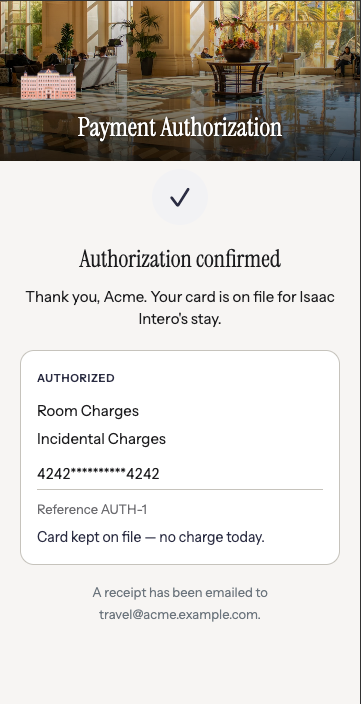
When a parent, employer or travel agent is paying for someone else's room, you email a PDF, wait for it to come back printed, signed and photographed — and it still may not hold up when the charge is disputed. Card Authorization Forms replace that with a link. The cardholder opens it, picks exactly what they're authorizing, enters their card and signs. You get a signed record and a card on file before the guest arrives.
Send it from the reservation: Open a reservation, click Request Card Authorization, choose Card on file (no charge now) or Charge immediately, tick what's covered — room, food & beverage, incidentals, reservation guarantee, or all charges — and the link emails to the cardholder. Links last 7 days, work once, and can be resent any time.
Built for a cardholder who isn't the guest: The form names both parties, so a parent or company can see whose stay they're guaranteeing before they commit — the situation a check-in card was never designed for.
Evidence, not just consent: Each submission is filed with the signature, the masked card, the address and security-code check results, the IP address and the timestamp — the record you want in hand when a charge is disputed. Secure card entry needs Shift4; on other providers the form still captures the signed authorization and your team takes the card as usual.
👉 Learn more about Card Authorization Forms →
Card Authorization Forms are enabled per property — email support@helloshift.com to turn them on for yours.
🔧 Fixes and Improvements
Your registration card answers, now in your messages
Vehicle plate, emergency contact, balance due, party size, special requests — anything your registration card or your PMS already holds can now be dropped into a confirmation text or email automatically. A parking message can name the exact car on file; a balance reminder can quote the exact amount owed. Nobody retypes it, so nobody gets it wrong. Your own field names appear in the variable picker, ready to insert.
👉 Using agreement field values →
Set your own booking link
When a guest asks about staying with you, the AI can text them a link to book, already filled in with the dates they asked about. You can now set that link yourself: go to AI Assistant → Text → General, search any stay on your own booking engine, and paste the link you land on. Tracking codes picked up from your browser are removed automatically.
👉 Set up your booking link →