📸 See the Finished Room, Not Just the Checkmark
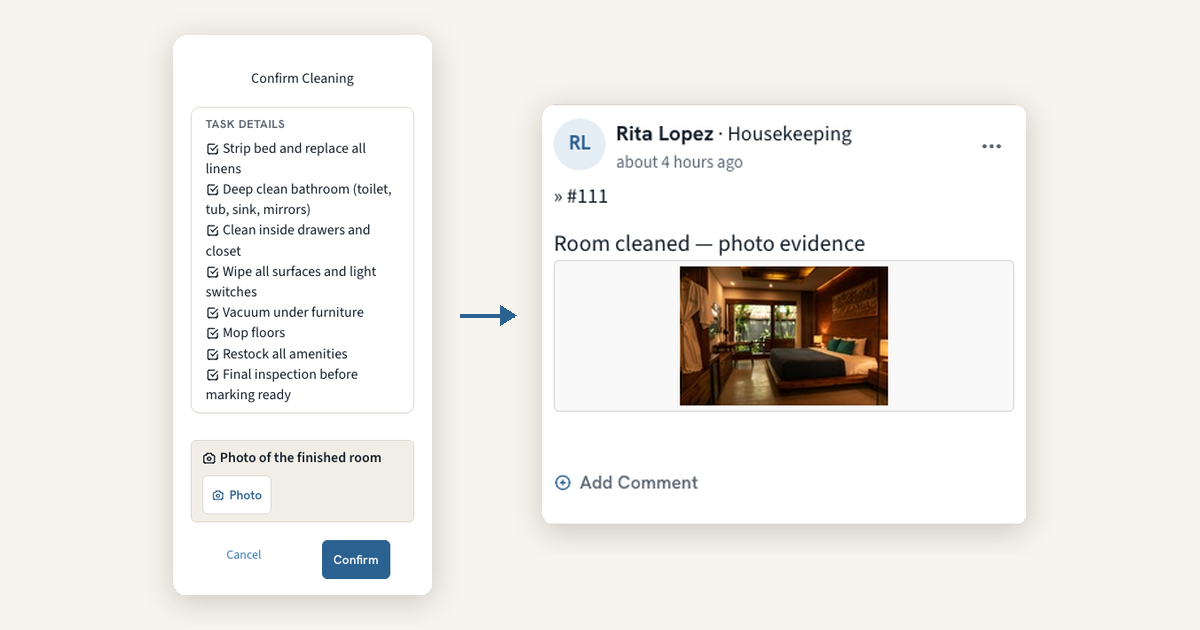
A room marked Complete tells you the cleaner tapped a button. It does not tell you what the room looked like when they walked out. Photo Evidence puts a camera at the two moments that matter: when a cleaner completes a room, and when an inspector fails an item. The photo lands in the room's Activity Feed where your team already looks, and managers can see at a glance which rooms have photo activity today.
Photo on Complete: Set it to Optional or Required under Admin > Settings > Cleaning > General and the Complete popup asks for a photo of the finished room. With Required, Confirm stays disabled until a photo is attached.
Failed items, with the picture: When an inspector marks an item Failed on the phone, the item offers Add a photo of the issue, and the photo shows on the inspection report right next to that item.
Built for the phone: Tapping Photo opens the rear camera directly, large photos are reduced before upload so they save quickly on hotel Wi-Fi, and Confirm waits for the upload to finish so a quick tap cannot lose the photo.
Photo activity at a glance: On Assignments, Overview, and Boards, a Photo activity badge marks rooms that had a photo posted today. Click it to open the room's feed.
👉 Learn more about photo evidence →
🔧 Fixes and Improvements
Two-pass cleaning with a pre-cleaning phase
If one team strips a checkout room and another does the full clean, you can now track the two passes as separate jobs, each with its own worker and timer. Add a name such as Strip/Prep under Pre-cleaning Actions in Admin > Settings > Cleaning > Custom Fields, and the cleaner can't start until the strip is done. Rooms move from Dirty to Pickup to Clean, and reports split pre-cleaning minutes from cleaning minutes, which helps if you bill owners by the hour.
👉 Set up the pre-cleaning phase →Check-in details now reach your PMS
When a guest finishes online check-in, the reservation in your PMS now shows what they did: whether they signed the registration card, whether a card was provided, and a permanent link to the signed agreement. Cloudbeds also receives the guest's arrival time, WebRezPro gets the summary plus the signed agreement as a document, and Mews profiles pick up the email and phone the guest confirmed whenever Mews had none or only an OTA relay address. Your front desk sees all of it without opening HelloShift.
👉 What gets sent to your PMS →