Changelog

Follow new updates and improvements to HelloShift.

🌍 Speak Every Guest's Language, Automatically
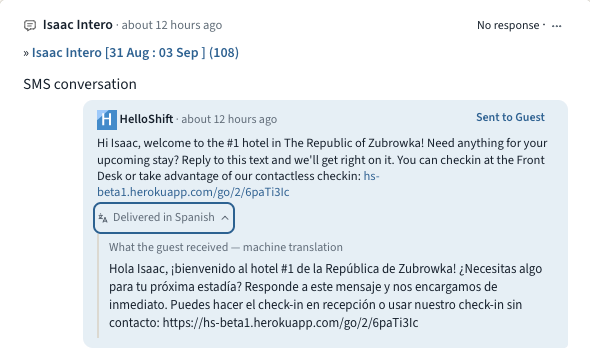
Some of your guests would rather not do everything in English. They book anyway, get a confirmation text they half understand, and end up calling the front desk. Multilingual Guest Messaging closes that gap. HelloShift learns each guest's language from their messages, calls, and check-in, keeps every conversation readable for your team in English, and with one checkbox sends your automated messages in the guest's own language.

  • Read every message: When a guest writes in another language, the message translates automatically in the Inbox. Translations are clearly labeled, you can always tap "Show original", and once a message is translated everyone on your team sees it.

  • Guest pages follow the guest: Online check-in, the guidebook, shop, and tipping pages all show up in the guest's language, and guests can switch languages at the top of check-in or the guidebook. HelloShift remembers the choice on the guest record. It even shapes how the Voice AI assistant greets returning callers.

  • Automated messages, translated: Tick Translate automated messages into the guest's language under Admin > Settings > Guest > Messaging and every automated and triggered message goes out in the guest's language: pre-stay, in-stay, key codes, and event triggers. Your team still sees the English original with a "Delivered in Spanish" line underneath, and you can review and correct every translation on its snippet.

πŸ‘‰ Learn more about guest languages β†’

πŸ”§ Fixes and Improvements

  • AI Insights, now on for every property
    AI Insights is now enabled for every property, and the daily report email has been rebuilt to match. The subject line carries the day's headline, the body reads like the report itself with KPIs, sections, and the narrative, and it renders properly on a phone. On the reports page, the Copy for morning meeting button turns the day's numbers into a paste-ready briefing.
    πŸ‘‰ Email reports β†’

  • Tokeet (AdvanceCM) rentals, connected to your AI front desk
    Running rentals on Tokeet or AdvanceCM? Our new certified integration connects your account in minutes. Authorize once under ADMIN > Site Settings > Integrations and your rentals plus upcoming bookings import automatically and stay current. Guest names, phones, and emails arrive ready for messaging, and arrivals, departures, and guest status feed your AI front desk, guest messaging, and housekeeping checklists. The sync is one-way by design: bookings flow in, while cleaning status and payments stay in Tokeet.
    πŸ‘‰ Set up the Tokeet (AdvanceCM) integration β†’

  • Every automated message, backed up by email
    A confirmation text lands, the guest skims it, and three days later they're hunting for the check-in link. Tick Send an email copy of every automated message under Admin > Settings > Guest > Messaging and every automated or triggered SMS or WhatsApp message is also emailed at the same moment, whenever the guest has an email on file. Messages that already went out by email are never sent twice, and every copy shows in the guest's conversation.
    πŸ‘‰ Learn more about the email copy β†’

  • Undeliverable texts move to the next channel automatically
    Sometimes a text just can't be delivered: a wrong digit, a landline, a WhatsApp number that was never registered. When that happens, HelloShift now re-sends the message on the next channel in your Order of Channels instead of leaving the guest unreached. Both the failed attempt and the re-send show in the guest's conversation.
    πŸ‘‰ Order of Channels β†’

πŸ’³ Third-Party Card Authorizations, Signed Online

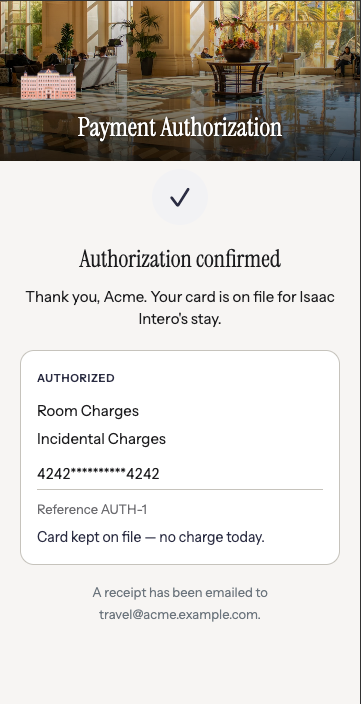
When a parent, employer or travel agent is paying for someone else's room, you email a PDF, wait for it to come back printed, signed and photographed β€” and it still may not hold up when the charge is disputed. Card Authorization Forms replace that with a link. The cardholder opens it, picks exactly what they're authorizing, enters their card and signs. You get a signed record and a card on file before the guest arrives.

  • Send it from the reservation: Open a reservation, click Request Card Authorization, choose Card on file (no charge now) or Charge immediately, tick what's covered β€” room, food & beverage, incidentals, reservation guarantee, or all charges β€” and the link emails to the cardholder. Links last 7 days, work once, and can be resent any time.

  • Built for a cardholder who isn't the guest: The form names both parties, so a parent or company can see whose stay they're guaranteeing before they commit β€” the situation a check-in card was never designed for.

  • Evidence, not just consent: Each submission is filed with the signature, the masked card, the address and security-code check results, the IP address and the timestamp β€” the record you want in hand when a charge is disputed. Secure card entry needs Shift4; on other providers the form still captures the signed authorization and your team takes the card as usual.

πŸ‘‰ Learn more about Card Authorization Forms β†’

Card Authorization Forms are enabled per property β€” email support@helloshift.com to turn them on for yours.

πŸ”§ Fixes and Improvements

  • Your registration card answers, now in your messages
    Vehicle plate, emergency contact, balance due, party size, special requests β€” anything your registration card or your PMS already holds can now be dropped into a confirmation text or email automatically. A parking message can name the exact car on file; a balance reminder can quote the exact amount owed. Nobody retypes it, so nobody gets it wrong. Your own field names appear in the variable picker, ready to insert.
    πŸ‘‰ Using agreement field values β†’

  • Set your own booking link
    When a guest asks about staying with you, the AI can text them a link to book, already filled in with the dates they asked about. You can now set that link yourself: go to AI Assistant β†’ Text β†’ General, search any stay on your own booking engine, and paste the link you land on. Tracking codes picked up from your browser are removed automatically.
    πŸ‘‰ Set up your booking link β†’

⚑ Checklists and Tasks That Create Themselves

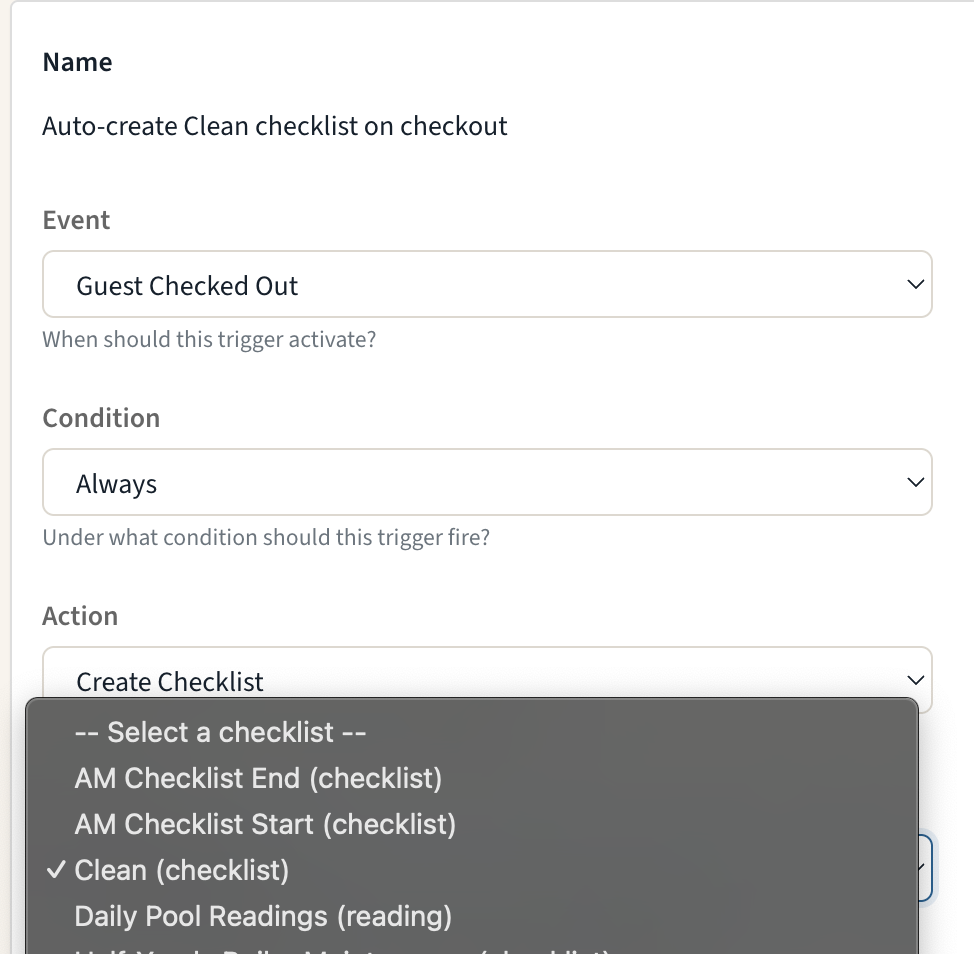
Stop recreating the same work by hand every time a guest arrives or departs. Triggers can now create checklists and tasks: pick a template, pick the moment β€” check-in, checkout, booking confirmed β€” and HelloShift generates the work automatically, tagged to the right room and linked to the right guest.

  • Create Checklist: Generate a checklist from any template the moment an event fires β€” a checkout-clean checklist for every departing room, ready before housekeeping walks the floor.

  • Create Task: Create a task (with its subtasks) from a task template, one per room, inheriting the room tag and guest link.

  • Smart by default: Multi-room reservations get one item per room, repeated PMS events don't create duplicates, and if a template is ever deleted the trigger switches itself off safely instead of failing silently.

πŸ‘‰ Learn more about Checklist & Task actions β†’

πŸ”§ Fixes and Improvements

  • Merge Duplicate Guest Records
    When the same guest shows up twice β€” a PMS double-send, a new phone number, a manually created record β€” admins can now merge the duplicate into the canonical profile right from the guest page. Notes, messages, tasks, stays, and history all move to the keeper, with a side-by-side review before anything is changed.
    πŸ‘‰ Learn how to merge guests β†’

  • OTA Guests Can Use the Kiosk Too
    Guests who booked through an OTA can now self-check-in at the kiosk using the confirmation number from their OTA booking email β€” HelloShift matches it to the PMS reservation automatically on supported PMS integrations.
    πŸ‘‰ Kiosk Self-Checkin β†’

  • Your Cleaning Week, On Your Phone
    The mobile app now has a weekly Room Calendar with a My/All filter, so cleaners and supervisors can see the whole week's room assignments at a glance β€” not just today's.
    πŸ‘‰ Room Assignments β†’

  • Shop, Arranged Your Way
    Drag to reorder your shop items β€” the guest storefront follows your order β€” and give the store its own banner image under Settings > Brand.
    πŸ‘‰ Shopping Feature β†’

Earlier updates